
April 8, 2025
Question

How to calculate Maryland "Income received during Non-residency"

  • April 8, 2025
  • 1 reply
  • 0 views

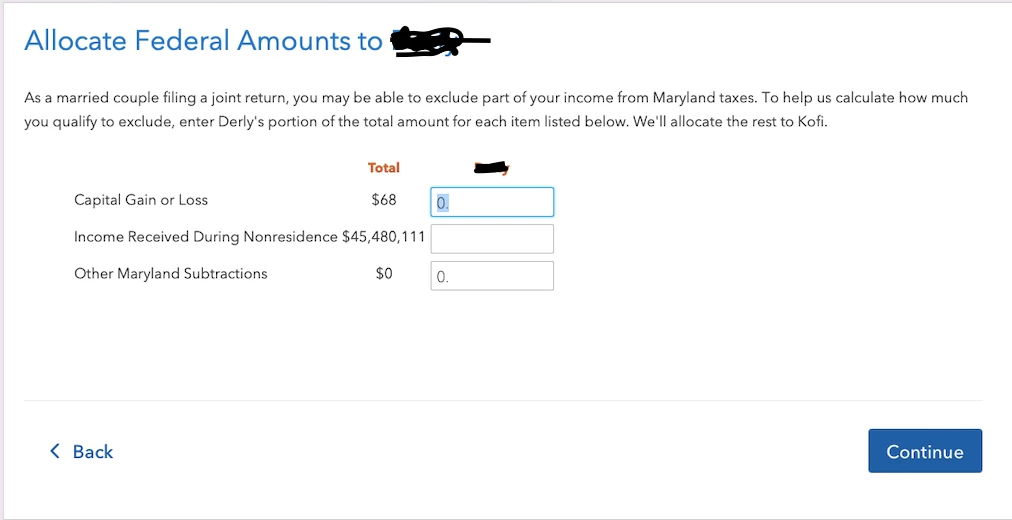
How do I calculate income received during non-residency for the scenario below? Adding box 1 from the two W2s for work done outside of Maryland, for myself and spouse is $5000 more than what was has been stated in the screenshot below . Adding box 5 is even more.
 

    1 reply

    April 8, 2025

    The calculation for income received during the nonresidency period can be completed in one of two ways.

    1. Use your statements and/or pay stubs immediately before you moved into Maryland (MD) to arrive at the amount (interest, dividends, wages). For wages use state wages box or if not the same as box 1 you can use box 1. 
    2. If all income is received evenly throughout the tax year you can divide by 12 then multiply by the nonresident months to arrive at your total.
    **Say "Thanks" by clicking the thumb icon in a post**Mark the post that answers your question by clicking on "Mark as Best Answer"
    weafriqueAuthor
    April 8, 2025

    My spouse and I have w2 for work done before moving to Maryland. I axpected this to be straightforward by adding wages earned on these W2. as previously stated, when values in box one is added, the amount is $5000 greater than what has been stated in the screenshot.

    April 8, 2025

    If you are unable to account for the additional $5,000 of income from another source we could take a look, see the information below.


    If you would like to send us a “diagnostic” file that has your “numbers” but not your personal information it would help.  If you would like to do this, here are the instructions:  (Don't forget to give us the state)


    TurboTax Online:

    Open your return -Go to the menu panel on the left side of your return and select Tax Tools. 

    1. Then select Tools below Tax Tools.
    2. A window will pop up which says Tools Center.  
    3. On this screen, select Share my file with Agent.
    4. You will see a message explaining what the diagnostic copy is.  Click okay through this screen and then you will get a Token number.
    5. Reply to this thread with your Token number and your state. This will allow us to open a copy of your return without seeing any personal information.

    TurboTax Desktop:

    If you like, you can send a copy of your return that will be scrubbed to eliminate your personal data by using these steps:

    1. Click on Online in the top left menu of TurboTax Desktop for Windows
    2. Select 'Send Tax File to Agent'* > Follow the prompts to reach the token number.
      • Enter your email used for TurboTax > Enter your code > Send
    3. Write down or send an image of your token number and state then place in this issue.
    4. We can then review your exact scenario for a solution.
    5. Please also tell us any states included in the return. This is necessary for us to view the return.
      • *If using a MAC, go to the menu at the top of the screen, select Help, then, 'Send Tax File to Agent')


    We will be able to see exactly what you are seeing and we can determine what exactly is going on in your return to provide you with a resolution.

    **Say "Thanks" by clicking the thumb icon in a post**Mark the post that answers your question by clicking on "Mark as Best Answer"




