

Solved
In the 1099-NEC section, it asks for a EIN number but I only have a TIN number. Where can I enter a TIN number?
No text available
Thank you Dawn for your help! Unfortunately, I still get errors. I am entering the numbers in manually and TT converts to dashes. I get error message either way and cannot continue.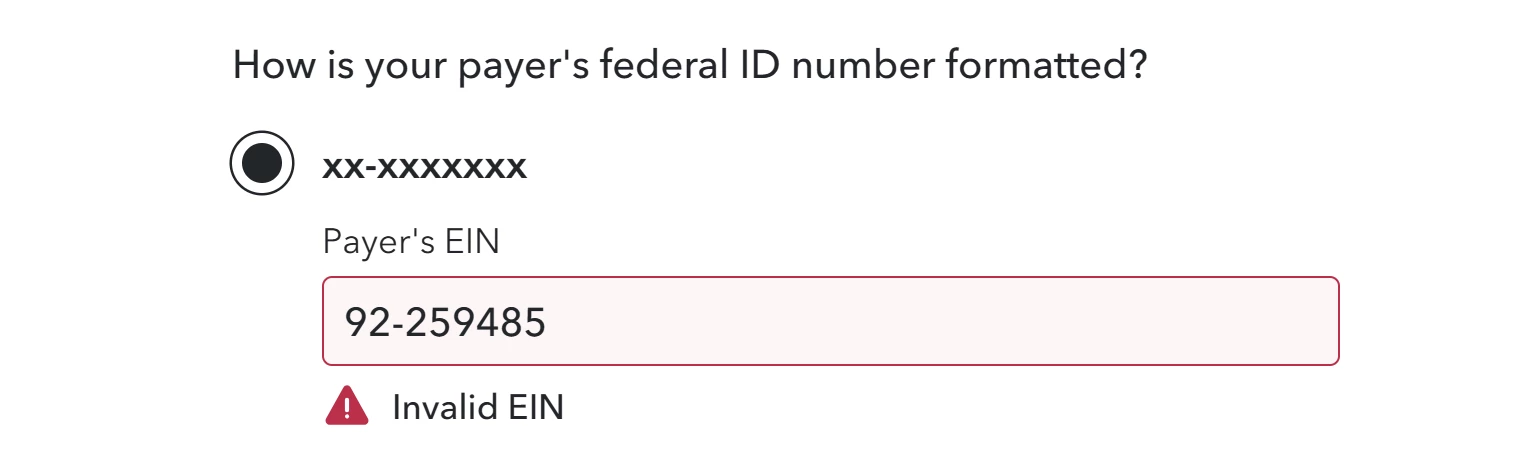 Screenshot 2025-03-02 Error 2 TT.png
Well a EIN is 9digits. Your screen shot is 1 digit short. should be 2 digits then 7 digits.
Same for ssn is 1 digit short. Should be 4 digits at the end.
Actually I would just enter your total income as Other self employment income or as Cash or General income. You don't need to get a 1099NEC or 1099Misc or 1099K. Even if you did you can enter all your income as Cash. Only the total goes to schedule C.

Our experts are available on-demand, no appointment needed. Get help all year long with TurboTax Expert Assist.
Enter your E-mail address. We'll send you an e-mail with instructions to reset your password.





©1997-2022 Intuit, Inc. All rights reserved.
Intuit,
QuickBooks, QB, TurboTax, ProConnect, and Mint are registered
trademarks
of Intuit Inc. Terms and conditions, features, support, pricing,
and service options
subject to change without notice.
Security
Certification of the TurboTax Online application has been
performed by
C-Level Security.
By accessing and using this page you
agree to the
Terms of Use.
Accessibility


