
February 13, 2024
Question

Crypto CSV & TurboTax Universal Template - Upload Problems

  • February 13, 2024
  • 3 replies
  • 0 views

I've wasted 9 hours with TT phone reps on a program glitch. They keep closing my case - no resolution. I NEED to talk to a true backend tech person who can review the matter and get it put in for coding resolution. Can't file until this is fixed!! Does anyone have any suggestions? I would really like to get on the phone with someone who actually understands the backend of the program so I can screenshare the problem. I've already done this with 5 reps over 9+ hours. It's infuriating.


Here's what's happening. There are multiple issues so hard to show in 1 screenshot. This is all related to the section for uploading a CSV or raw data for Crypto transactions. I used the "TurboTax universal template" to input my raw data into. I cannot do manual entries as the crypto exchange went bankrupt and I have no sales, only their liquidations (losses). The manual entry doesn't have the right field to accept that sort of information.

When I go to upload my CSV file (based on the TT template format), I get this error that there are "duplicate Transactions Ids" (whereas "transaction IDs" is a column heading/data field in the file). However, my file has no duplicates in this column. I even tried to upload a version where that column was both erased entirely, or the data below the header was removed. Got the same message. Why would it identify an error in a column that wasn't even in the CSV?
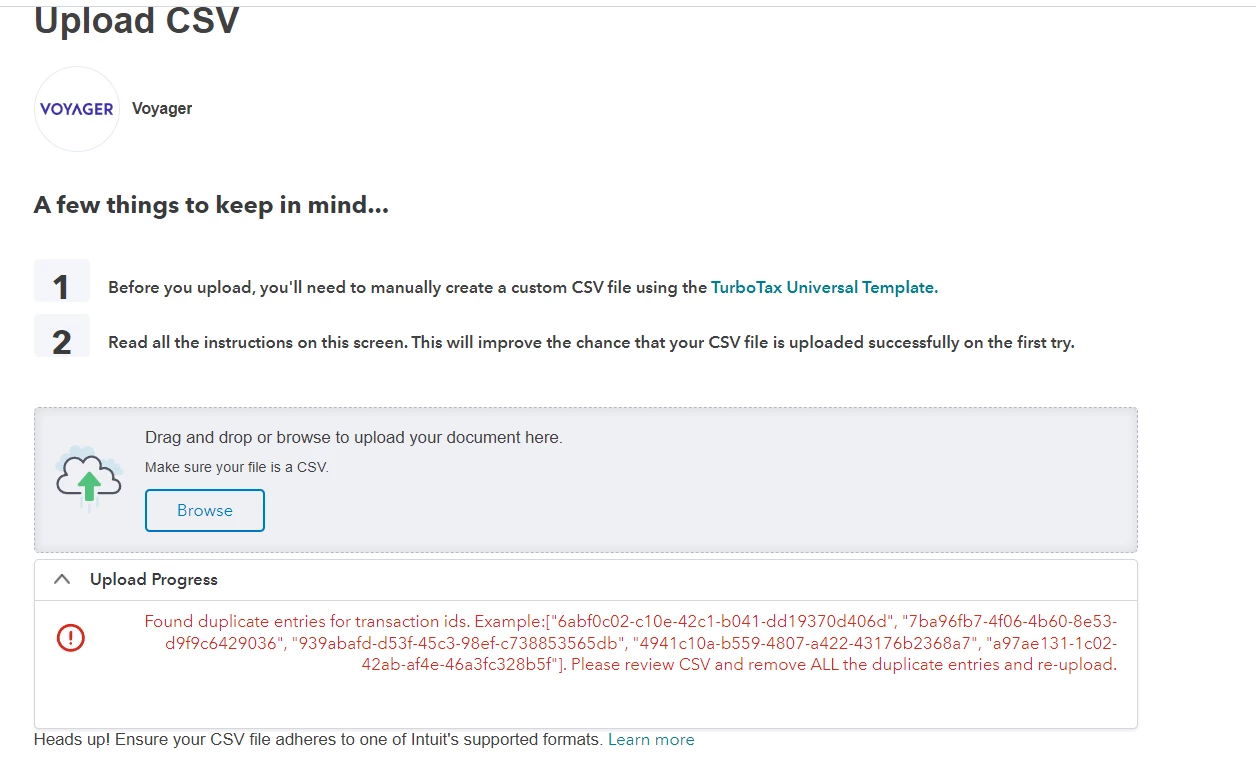
So then I took the original "TurboTax universal template" CSV file, which comes with populated sample transactions in it. I didn't alter it, and then I uploaded that as is to see if that would upload the sample transactions into my form. That gave me this error message: "Malformed CSV file uploaded. Please upload the file in proper CSV format." Mind you, this is the error given for the TURBOTAX FORMATTED FILE with your sample data.


Screenshot 2024-02-13 160500.png


This leads me to believe there is a backend error with this upload/import component. Yet I cannot get any real help on this and customer support keeps sending me the same useless articles, and trying to sell me on the Live tax help option for more $$ where you get CPA assistance. A CPA cannot fix a programming glitch in TT! I've talked to numerous escalation supervisors only to be told that my escalation is being denied!! This wholly unacceptable. I've rebuilt my file countless times, cleared cookies/cache, and tried different browsers (Chrome, FF, Edge). In fact, when using Firefox & Edge to try to upload a file here,  it doesn't even get to the error message stage, it just hangs/spins on the upload.


HELP!!! I cannot file my taxes until this is resolved! If I can get a real technical support person on the phone who can create an actionable, trackable issue to get this investigated and fixed, I would be willing to walk them through the problems via screenshare. But calling the phone number is useless. I have a case number,w which they keep closing.


 

3 replies

February 14, 2024

Can anyone at TurboTax please address this? I really need help. Thanks!

February 15, 2024

Have you investigated the Investor Center here?


  • Then click TurboTax Investor Center in the center of the screen.
  • Click Get started.

The Investor Center can download data from wallets / exchanges using an API Key and Passphrase.  


Would this method allow you access to the data you are referring to?


The information can be reviewed and edited similar to the processes you see in TurboTax Online Premium.


Investor Center generates a CSV file which can be uploaded into TurboTax Desktop or TurboTax Online.


Let me know whether this is helpful.


@klhrabosky 

**Say "Thanks" by clicking the thumb icon in a post**Mark the post that answers your question by clicking on "Mark as Best Answer"
February 15, 2024

No this won't work because the platform (Voyager) is closed/inactive because they filed for bankruptcy.  Nothing can be pulled from that service via any API. This is not a user error/issue. This is a programming glitch in the TT software. The TT tool won't even upload the unaltered TT universal template properly, which is supposed to be in the proper format that the program requires. I NEED to connect with a true product support person who can enact this as a real trouble ticket that will get remediated on the backend coding/tech troubleshooting.

February 21, 2024

Hey!


After several hours of troubleshooting I FINALLY found a solution for this.


Check your "Type" column. If there is a transaction that is labeled as "Fee", change it to "Expense" (without the quotation marks of course).


This obviously doesn't change the backend error on TurboTax' end of this, but it allowed me to upload my transactions.


TurboTax reps, if you're reading this: please report this error to the appropriate department responsible for this!


GOD BLESS! 😁

March 3, 2025

This worked. Check the Type. I had been having horrible trouble with Betterment. I had to change the Type of Fees to make it work, even though TurboTax was throwing errors with the transaction ID that was totally unrelated.

February 23, 2024

It seems that my suggestion below is similar to one post above, which did not work for you. Sorry about that - for some reason I saw only your question and not the entire thread with replies.  Anyway, here is a potential solution for importing  Crypto transactions using Gain/Loss reporting with a CSV file structured with just a few columns.


If you need only to report your Gain/Lost transactions, this will get your transactions into TurboTax with the bare essentials for Capital Gains reporting (similar to Stock transactions).


I suggest using a sample test file with 1 transaction. If it works, you can structure an import file with all of your transactions the same way, or, if you prefer, divide your transactions by Wallet.  


To prepare the Import File, Create a CSV (spreadsheet) with these columns in Row 1

Date Sold
Purchase Date

Currency Name

Cost Basis

Proceeds


Example:

Date SoldPurchase DateCurrency NameCost BasisProceeds
10/1/23 15:2110/1/22 15:21BTC40004498.5


Be sure to name the columns exactly as shown above, and be sure to structure the Date fields exactly as they are shown above . There is a single space between the words in the first 4 columns. This is very important. 


Once you have the file structure, I suggest creating a dummy transaction file with one of your "Trades", Saving the file as a CSV and performing a test import.


Steps for the Import


1. Go to Wages and Income
2. Click Investments and Savings

3. Click Add Investments

4. Select Cryptocurrency and Click Continue

5. Select Upload it from my Computer (Use a CSV file) and Click Continue


When you see "What's the name of the crypto service you used?"

1. Select Other as the Crypto "service"

2. Give the Import a name (for the test, something like Test 5 col Gain Loss format)
3. Select the first option for CSV type (Gain/Loss Report or CSV) . This specifies the csv file structure, and is important.

4. Click Continue and you will see"Go ahead and upload your crypto CSV file"

5. Use the Browse or Drag and Drop to import the CSV file with your transactions.


If your test file matches the example I provided above, the results should show the Capital Gain as $499. 

One final note - this is not a solution for importing everything that occurs in a Crypto account, and should only be used for simple Gain/Loss reporting of "trades".


April 8, 2025

Thank you for providing the sample upload.  I matched EXACTLY the column names, however, I only had dates in my CSV.  It was erroring and saying needed column names etc. but the real problem is once I added "12:00" to the date, it loaded fine (so stupid).



