
March 9, 2025
Solved

Taxable amount rolled over for 1099-R not calculated correctly by Turbo tax 2024

  • March 9, 2025
  • 2 replies
  • 0 views

Hi,

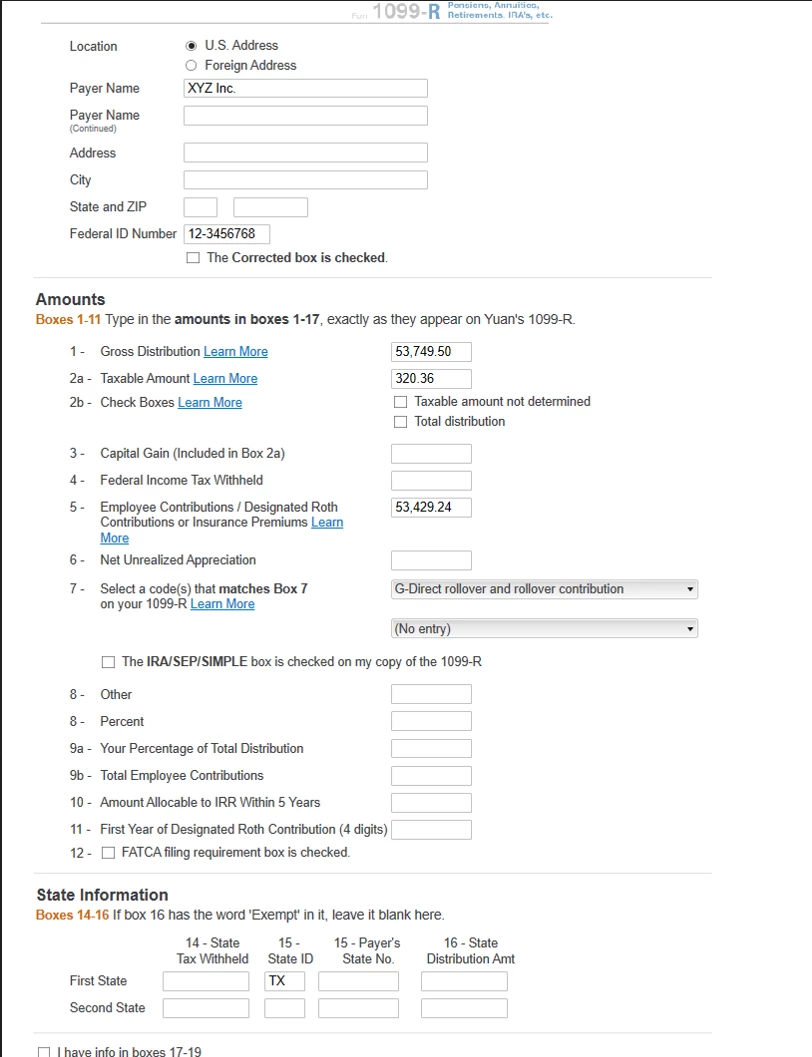
I have received 1099-R for 2024 for rolling over $53750 from an after-tax 401k account to a Roth IRA. I contributed $53430, so the gain of $320 is taxable.

In 1099-R,

Box 1: $53750

Box 2a $320

Box 5 $53430

Box 7 G

In step by step Tax entry, I selected Yes to the question "Was this Money Rolled Over to a Roth IRA?"  and Yes to the question " Did you make after-tax contribution to this 401(k) or 403(b) plan" and entered "$53430" as the amount I contributed. Although I don't know if Turbo Tax actually retains the answers to these two questions as every time I open this 1099-R Entry to check, these two seem to have the default "No" ansswers.

However, in 1099R Summary form,
line 26 (Taxable amount in box 2a, Form 1099-R) shows 320, which is correct
line 26a (Taxable amount rolled over) incorrectly shows 0 instead of 320
line 31 (Taxable amount of Roth IRA conversions) shows 320
line 321 (Taxable amount of distributions) shows 640 instead of 320


In 2023, I have a similar situation and the line 26a was calculated correctly. How can I fix this issue without overriding line 26a? I believe I won't be able to efile if I override it.

Your answer would be greatly appreciated.

JoAnn
    Best answer by SteamTrain

    Looks like one of the pictures was not uploaded successfully, here is it :


    @JoAnnNB @DanaB27 


    OK...this is the strangest error I've ever seen.

    I repeated your problem exactly...the cents parts were critical.

    ______________

    THEN....I did notice one thing....


    The value of two boxes of the 1099-R must add up to 53749.50 (as long as box 1 is correct).

    ....but...they add up to 53749.60   not xxxxxx.50


    1)  So...changing box 2a to 320.26 results in the 320 being properly entered on line 26a of the 1099-R Summary, and an "ALMOST" correct $321 being posted to line 5b of the form 1040.  (rounding issue?)

    __________________

    2)  (Removed..not quite correct 2nd part)

    _________________

    Thus I suspect a strange issue in the behind the scenes calculations, that somehow detects the 10cent error that results in nothing being placed in line 26a of the 1099-R Summary sheet (should be $320)

    _____________________

    What to do?  I would just go ahead and set box 2a of the 1099-R to 320.26 and if that works for you too, then move on. Yeah, your line 5b of the 1040 is $1 too high at $321......you can probably live with that. 

     (whole bunch of rounding nonsense going on)

    _________________

    @DanaB27 

    I've seen a number of posts this year where people are porting similar issues  (A doubling of the 1099-R, box 2a taxable amount).....Perhaps they have some subtle mis-## entry issues too.

    ...but shouldn't be that drastic for 10 cents screwing up the entire 1099-R Summary worksheet??

    2 replies

    JoAnnNBAuthor
    March 9, 2025

    I found in 1099-R Additional Distribution Information, B1 (Check if the entire distribution rolled over) is checked, so my entry in Step-by-Step was retained correctly, but somehow the info was not reflected in Line 26a.


    I checked my 1099-R entries for 2023, all my entries in 2024 are done the same way as 2023 for 1099-R and 1099-R Additional Distribution Information, but the 1099-R Summary for 2024 calculated 26a differently than 2023 for some reason. Maybe there is a new software bug?

    JoAnnNBAuthor
    April 10, 2025

    This appears to be a Turbo Tax bug. I spoke to Turbo Tax support and the person agreed with my assessment. In order to correct this software error, I have to override 26a on 1099-R Summary from blank to the amount that was rolled over. As a result, I don't seem to be able to e-file.

    Is there a way I can correct this error and still be able to e-file?  


    Thanks

    April 16, 2025

    I tested this and it seems it was fixed. I'm showing $320 on line 26a.


    @JoAnnNB 

    **Say "Thanks" by clicking the thumb icon in a post**Mark the post that answers your question by clicking on "Mark as Best Answer"
    JoAnnNBAuthor
    April 24, 2025

    Hi, @DanaB27 :

    Thank you for the reply. 

    I installed the latest TurboTax update, removed the over-ride of 26a, but I still got the same issue. I then tried additional testing by adding a second  test1099-R form that has identical info as the original one just in case the calculation only applies to a new entry. However I saw the same issue with both entries as shown below.

    Do you have any suggestion on what else I can try or how I may further debug this problem?  


    Here is the info on 1099-R Additional Distribution Information,


    Thank you,

    JoAnn


    SteamTrain
    April 24, 2025

    If you are still working on it..


    I tried one (Windows 11 Desktop Premier) with 50,222 distribution and 50,000 after-tax contributions (222 taxable) and it worked OK for me.   (with latest update rev 024.000.0355)

    _________________________

    One thing you could try.......is to open the 1099-R Summary again in Forms Mode.

    Then go to the bottom of the window and select  Delete Form.


    That will delete the 1099-R summary, but then it will immediately regenerate it.

    Open that 1099 Summary again and see if it's still wonky.

    ________________________

    Beyond that, I'm clueless.

    Perhaps delete every 1099-R you have and re-enter that one manually.  Don't import from the provider. Don't upload a picture of it or a PDF file of it.  Enter it all manually.   (Just a wild longshot)


    ____________*Answers are correct to the best of my knowledge when posted, but should not be considered to be legal or official tax advice.*




