February 22, 2024
Solved

Securities lending program from Schwab

  • February 22, 2024
  • 1 reply
  • 0 views

My Turbotax 2023 is also showing the 1099MISC entry from Shwab as a personal business.  I am not getting the inquiry "was there intent to create income" hence I'm caught in a loop where the interest income is showing as

business income and can't get out of it.  How do I make the changes required?

    Best answer by DianeW777

    The fact that the income is reported on a Form 1099-MISC indicates it is not for self employment reasons.  If you were involved in a self employment transaction then they would be required to report it that way using Form 1099-NEC.  For this reason, you should not be concerned about entering your 1099-MISC as 'Other income' without paying self employment taxes on this income.  


    You can delete the Form 1099-MISC and then enter the income following the steps below.


    1. On the menu bar on the left that shows. 
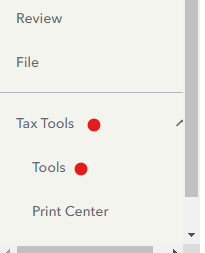
    1. Select Tax Tools 
    2. On the drop-down select Tools 
    3. On the Pop-Up menu select Delete a Form 
    4. This will give you all of the forms in your return 
    5. Scroll down to the form you want to delete 
    6. Select the Form 
    7. Click on Delete

    Always use extreme caution when deleting information from your tax return.  There could be unintended consequences. 

    Other Miscellaneous Income:


    Go to the Wages and Income  section of TurboTax

    1. Scroll to  Less Common Income > Select  Miscellaneous Income, 1099-A, 1099-C
    2. Select Other reportable Income > Enter a description (----) and the amount

    @osanbat9 


    1 reply

    DawnC
    February 22, 2024

    Delete the entry you made and re-enter the 1099-misc using the linked instructions.    To ensure the income shows up as personal income and not self-employment, make sure you answer the follow-up questions as follows:


    • Income does NOT involve work like your main job
    • Only received the income in 2023
    • Income did NOT involve an intent to make money


    Answering those questions any other way will classify the income as business/self-employment. You will get those questions if you choose None of the Above as a reason you received the money, after entering a description.  

    **Say "Thanks" by clicking the thumb icon in a post**Mark the post that answers your question by clicking on "Mark as Best Answer"
    osanbat9Author
    February 23, 2024

    Thank you for the response, however, I did receive the securities lending money in 2022 also, but I was able to correct things easily last year.  Unfortunately, I don't recall what I did last year to make life simpler.  By answering it is ongoing income as long as I participate in the Schwab securities lending program, does that make me a small busines?  Can I just say, no, this is the first year?  I'm not looking to deceive the IRS, they don't take kindly to that.... but I think the Turbotax software needs take into account these new Broker programs.

    DianeW777Answer
    February 27, 2024

    The fact that the income is reported on a Form 1099-MISC indicates it is not for self employment reasons.  If you were involved in a self employment transaction then they would be required to report it that way using Form 1099-NEC.  For this reason, you should not be concerned about entering your 1099-MISC as 'Other income' without paying self employment taxes on this income.  


    You can delete the Form 1099-MISC and then enter the income following the steps below.


    1. On the menu bar on the left that shows. 

    1. Select Tax Tools 
    2. On the drop-down select Tools 
    3. On the Pop-Up menu select Delete a Form 
    4. This will give you all of the forms in your return 
    5. Scroll down to the form you want to delete 
    6. Select the Form 
    7. Click on Delete

    Always use extreme caution when deleting information from your tax return.  There could be unintended consequences. 

    Other Miscellaneous Income:


    Go to the Wages and Income  section of TurboTax

    1. Scroll to  Less Common Income > Select  Miscellaneous Income, 1099-A, 1099-C
    2. Select Other reportable Income > Enter a description (----) and the amount

    @osanbat9 

         

    **Say "Thanks" by clicking the thumb icon in a post**Mark the post that answers your question by clicking on "Mark as Best Answer"




